The Gates Foundation + Macmillan Learning


Following the deployment of the concept simulations, the second phase of this project would focus on intensive iteration of the tools. What began as an effort to refine the existing tools ended with a clear conclusion: we had been designing for the wrong problem. Over spring and summer, we monitored adoption data, ran in-person research sessions at five schools, and comprehensively rebuilt the student experience before fall. Students didn't need a better way to find resources. They needed to know each other first.
Coming off creating the concepts in Phase 1, Spring 2023 represented the first longer-term deployment of both tools, the Resource Network and the Sentiment Survey. Our team monitored adoption and engagement metrics throughout the semester while students and instructors used the tools in their live courses.
Adoption was limited. While most participating courses had the tools available, actual engagement was consistently low. Instructors generally drove students to sign up, but few reinforced active use throughout the semester. Students who joined rarely returned. The data gave us insight into how the current iteration of the tools were working for the students, but the fuller picture would require getting back in the room with students and instructors. We planned a series of in-person research sessions for the summer.
Over the summer, our team traveled to five institutions to conduct full-day research sessions with students and instructors. Each visit was structured as a split workshop: the first half focused on instructors, the second on students. The goal was to understand not just what was and wasn't working, but why — and what it would take to design something students actually wanted to use.
We held sessions at Talladega College, Sul Ross State University, Santa Barbara City College, and Cerritos College. Each visit, I opened with an instructor workshop which featured a Collaboration Retrospective Activity designed to understand how instructors actively elicit collaboration in their courses, and to identify the approaches and frameworks we could learn from and emulate through our tools. The afternoon shifted to students, who participated in a Gallery Walk: moving through printed interface components of the tools they used throughout the term. The printouts included tool features, channel structures, weekly prompts and the students left sticky-note feedback on what resonated, what confused them, and what they wished the experience could do.
Across every school, the same barriers surfaced. Students at institutions hundreds of miles apart described the same hesitations in almost the same words.
Students associated Discord with gaming and niche communities. Many arrived with anxiety about a platform they had never used, and several couldn't get past the interface to engage with the content at all. The platform's identity worked against adoption before a single message was sent.
When students joined and found little or no activity, they read it as a sign the tool wasn't worth their time. The ghost-town effect was self-reinforcing: low activity drove disengagement, which kept activity low.
The peer recognition system was consistently misread. Students at multiple schools thought endorsements involved signing up for something or receiving payment. Suggested alternatives (shout out, recommended, advertise) pointed toward the same underlying concept, but framed around a specific action rather than an abstract credential.
Across schools, students described the same hesitation: asking a stranger for help felt risky. Fear of rejection, not knowing who was on the other end of a message, and the absence of any shared context made the tool feel socially unsafe before it could feel useful. Belonging had to come first.
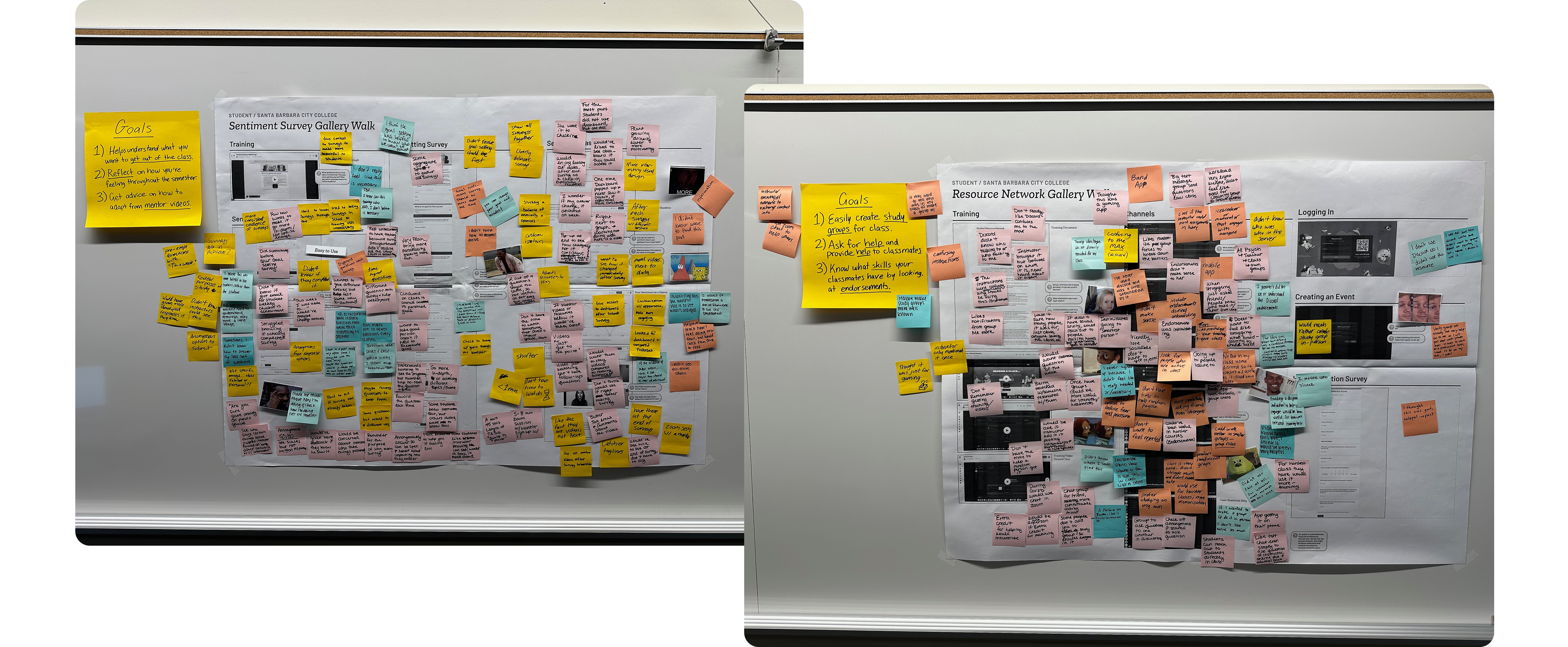
The most formative insight from the summer sessions didn't come from any single sticky note, it came from Talladega instructor Tiffany, whose Collaboration Retrospective laid out one of the most intentional peer-connection frameworks we encountered across any school. Her approach centered on what she called the tribe: randomly assigned groups that stayed together for the entire semester, anchored by a 'Culture Code' at the start of term. She established group norms, shared expectations, and a structured conversation about each student's strengths before any collaborative work began.
Over the course of the semester, roles shifted from instructor-assigned to peer-assigned. Students co-facilitated, teaching chapters to each other and taking responsibility for the learning of the group. She stayed active in every group herself, not as an overseer but as a participant. She coached high performers to step back and make space. She monitored GroupMe threads to see whether students were communicating outside class. One note on her activity board read: "[She] facilitates students seeking help in ways that the Resource Network tries to — meaning she was already doing manually, through relationship and intention, what our tool was attempting to do. The tools assumed students were ready to ask for help. They weren't, at least not from strangers.
"I need to know these people for me to feel comfortable to help or reach out for help."
— Student participant, cross-school synthesis
This framing reoriented the entire problem statement. We had been designing tools to help students find resources, but students already had platforms they trusted for that. What they were missing was the context to feel like they belonged in the room. The Resource Network, as conceived, was solving the wrong problem.
Before landing on a direction, we evaluated a range of chat-based alternatives to address the Discord-specific barriers. Tools that offered similar messaging capabilities without the brand friction. But each evaluation brought us back to the same realization: if students already had messaging platforms they preferred, adding another one wasn't the answer. We needed to design for belonging, not for messaging.
That reframe transformed what the tool needed to be, and the Resource Network gave way to something new. Spark, renamed and rebuilt from the ground up, became the full focus: a tool designed to help students connect with one another.
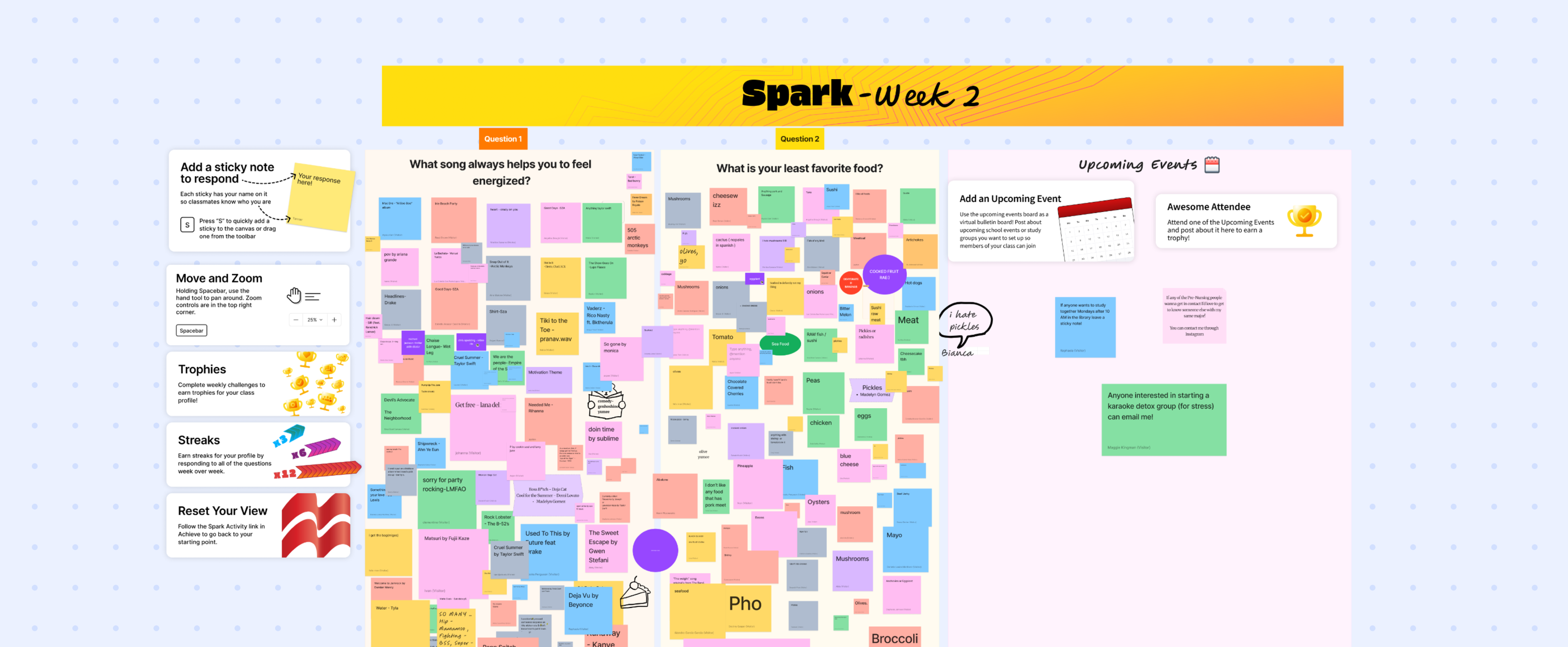
The new tool, Spark, moved to FigJam, a collaborative visual canvas that invited students to participate through sticky notes, images, and prompts rather than a message feed. FigJam felt fun and low-stakes. The interactivity of the platform helped lower the barrier to entry and gave the experience a quality that felt distinct from normal coursework.
It wasn't a frictionless choice. There were some concerns about FigJam introducing its own barrier: most students had never used a whiteboarding tool, and asking them to navigate a new canvas environment carried its own risk of confusion. We addressed this deliberately through in-tool onboarding, simplified weekly layouts, and extensive testing to eliminate tripping points before deployment.
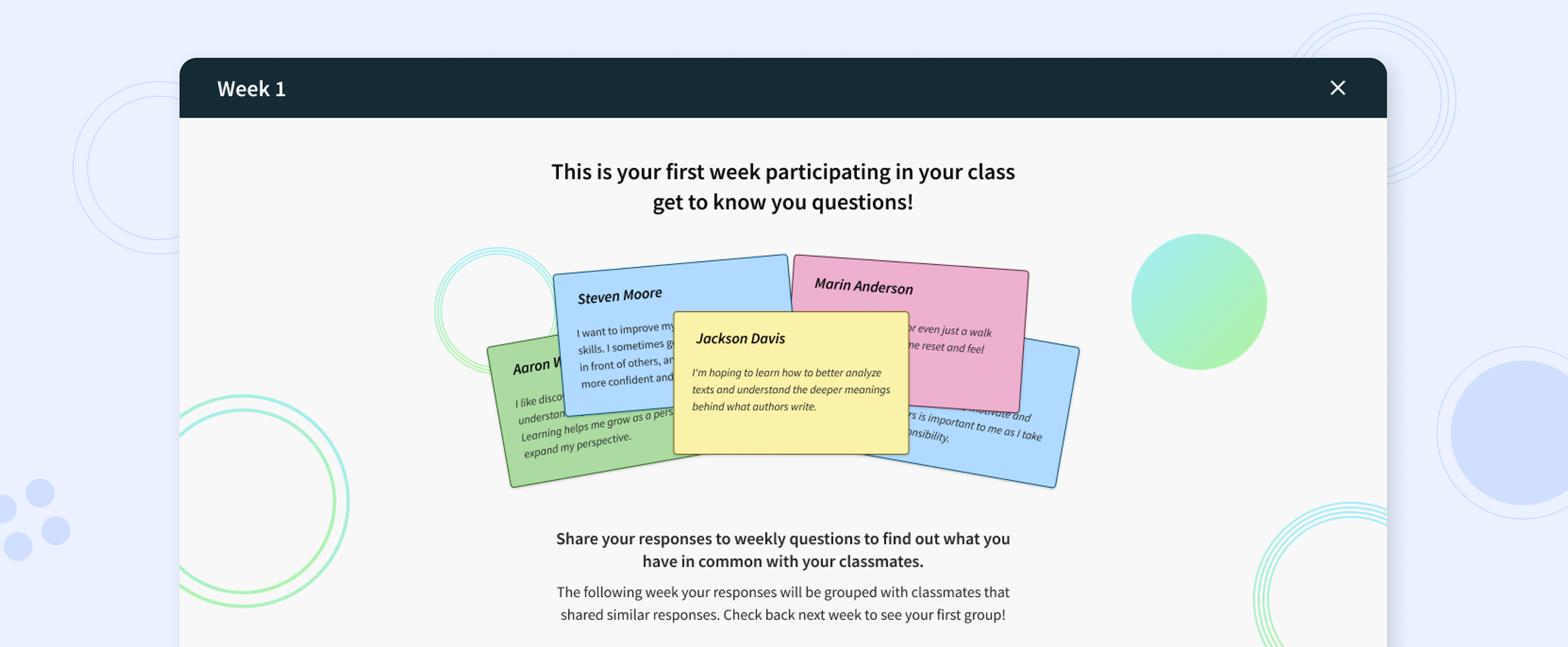
The board was structured by week. Each week presented two prompts, alternating between get-to-know-you questions (hobbies, music, interests) and metacognitive questions focused on the course (why they enrolled, how they learn best, what they've taken away from the course). Week 1 opened with four prompts — year and major, preferred communication style with peers, something they enjoy outside class, and something they hoped to learn — plus a photo profile setup: the My Class section that put faces and names to classmates before any peer interaction happened.
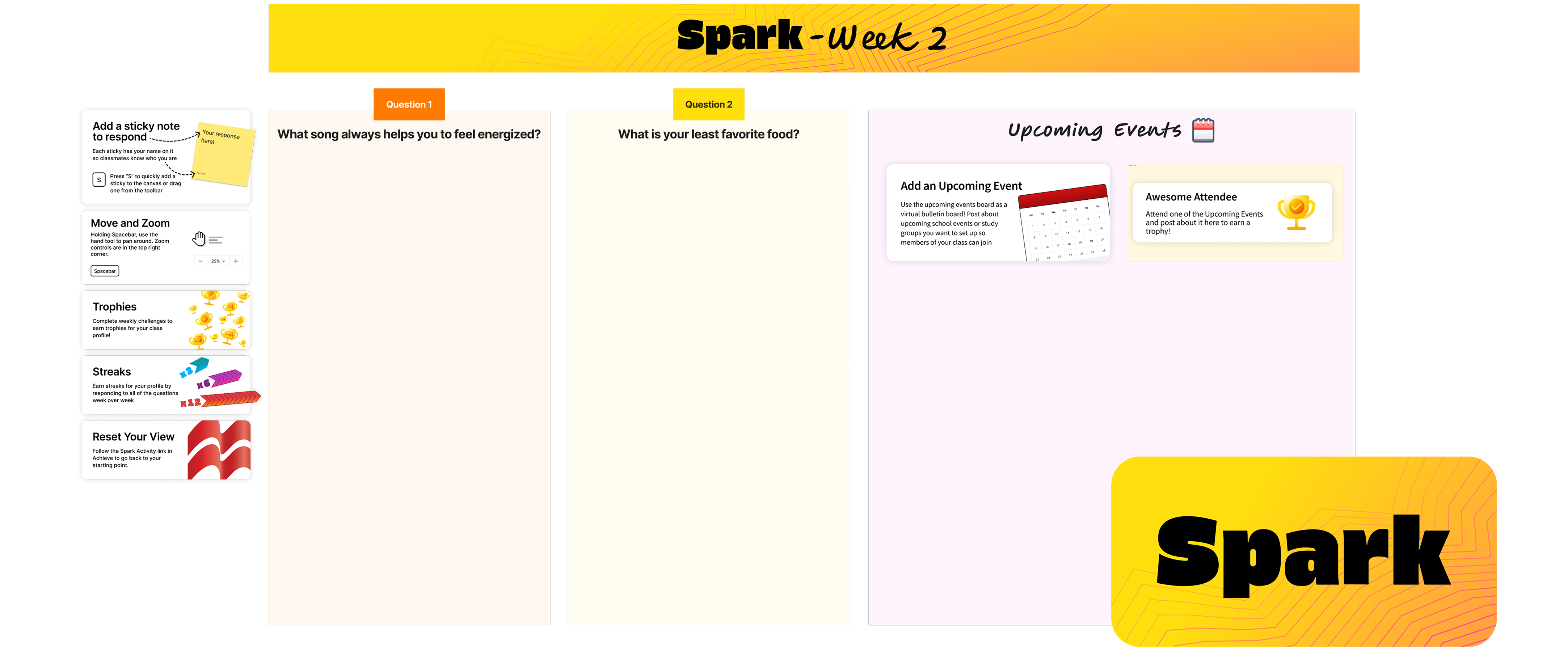
Every week's board included a persistent instructions panel on the left side, covering how to add sticky notes, navigate the canvas, and find the toolbar. This directly addressed the onboarding failure we had observed across every school: students who didn't know where to start simply didn't start. By embedding orientation into the tool itself, we removed the dependency on instructors to explain the platform and gave students clear, accessible instructions for navigating FigJam itself.
To the right of each week's questions, students encountered a rotating set of features designed to deepen engagement beyond the prompts:

The replacement for Endorsements, renamed and reframed around a specific action. "Has a classmate helped you out with class this past week? Give them a shout out here." The same peer recognition intent, but grounded in a moment students could recognize and act on.

Students submitted questions through a linked Google Form. Our team posted them to the board the following week for classmates to respond to. This created a low-stakes help-seeking pathway for students who weren't yet comfortable asking openly, and turned individual questions into shared resources for the class.

A virtual bulletin board where students could post about school events, study sessions, and activities on campus. More than a scheduling tool, it let students find each other outside the classroom.
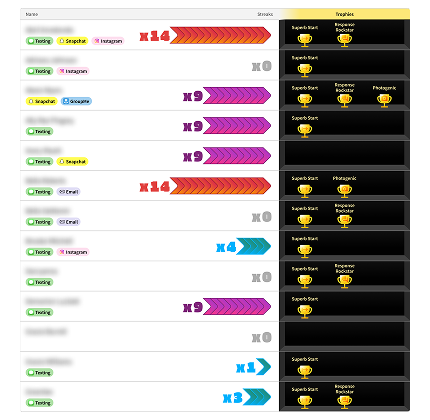
To address the engagement loop problem (the ghost-town effect that had plagued the Discord version), Spark introduced a lightweight gamification system. Students earned streaks for responding to weekly prompts consistently across the semester, and trophies for completing specific interactions: adding a profile photo, attending an upcoming event, giving a shout out, responding to anonymous questions, organizing a study group, and more. Each trophy named a specific behavior and created positive feedback for students who engaged with the less-visible parts of the board.
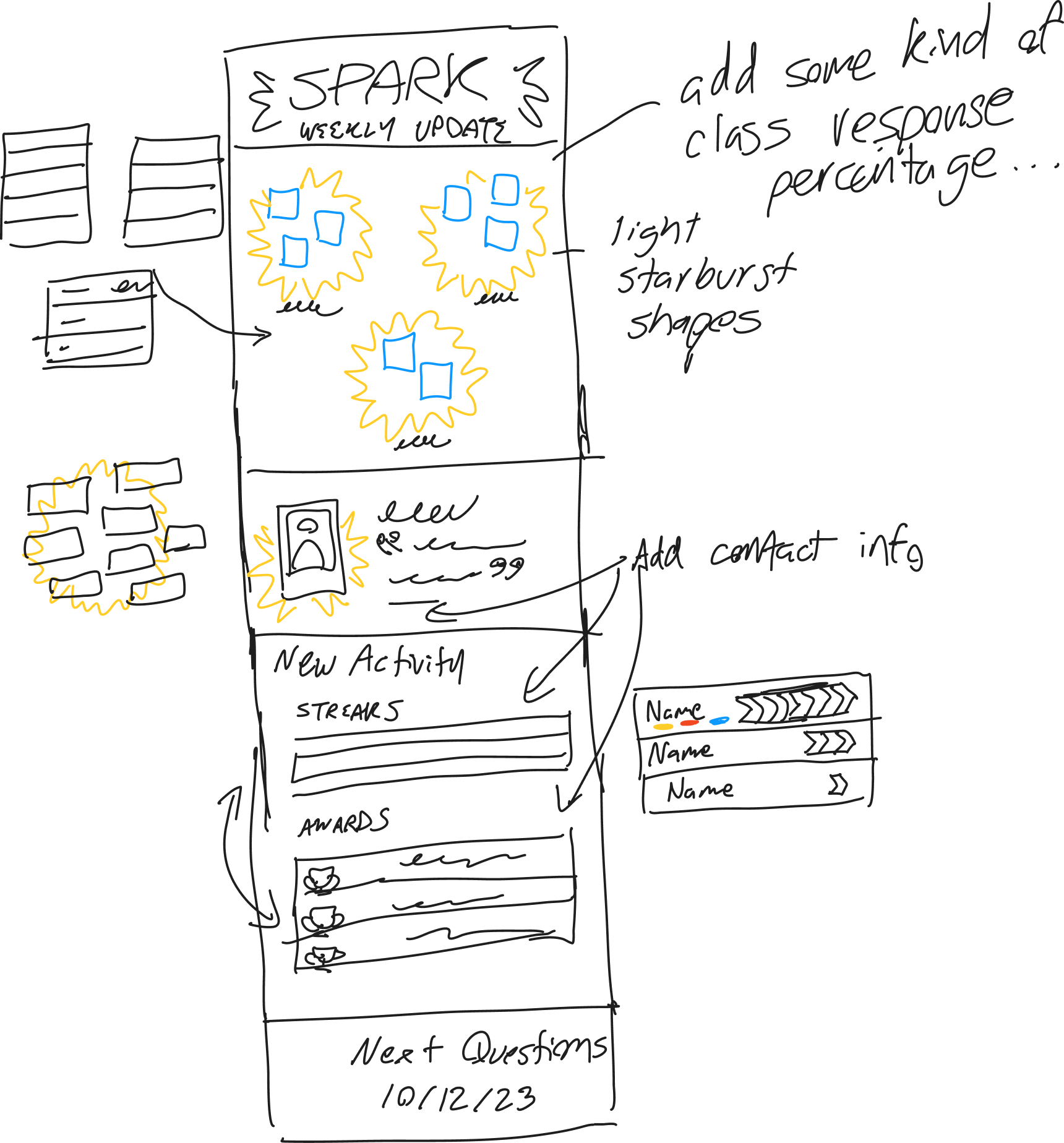
After each week closed, students returned to find a Weekly Spark Report, a curated summary of the previous week's responses, manually assembled by our team. Similar responses to each prompt were grouped together, surfacing patterns and shared perspectives across the class. The report gave students a reason to come back mid-cycle and helped them see themselves as part of a cohort rather than isolated contributors to a board.
Alongside the grouped responses, each report included a leaderboard listing every participating student's name, their preferred social channels (shared during Week 1 onboarding), and their current streak count and trophy cabinet. This made the gamification layer visible and social where students could see their own progress and quickly identify where and how to connect with their peers outside of the board.
The Sentiment Survey was rebranded as Pulse, a name that better reflected its purpose as an ongoing check-in rather than a one-time assessment. The redesign here was more focused than Spark's: we moved the survey infrastructure from Google Forms to Qualtrics, streamlined the reporting dashboard to surface clearer insights for instructors, and cleaned up the student-facing experience. The questions and core structure remained intact, with the emphasis focused on making the data more useful to the people receiving it.

Fall 2023 would mark the deployment of the redesigned tools. We structured fall setup around a key lesson from spring: passive availability wasn't enough. The tools needed to be where students already were.
One of the most significant structural changes was embedding Spark and Pulse activities directly into participating instructors' Macmillan Achieve courses as pre-assigned activities. This removed the setup burden from instructors entirely and put the tools in the same flow where students already spent their course time. No separate login, no separate platform to remember, no extra step between getting the assignment and completing it.
I consolidated instructor onboarding into a central Notion hub: documentation, FAQs, training materials, and context for the research behind the redesign, all in one place. We ran training sessions again before the semester started. And within Spark itself, the in-tool onboarding panels gave students a self-serve orientation that didn't depend on their instructor remembering to explain the platform.
After a spring that gave us mostly questions, we went into fall with a clearer bet: if students saw their classmates as real people first, they might actually use what we built. Whether that held up was still to be seen.
Two semesters of live classroom data validated the Phase 2 redesign, and the results were compelling enough that Macmillan committed to building both tools natively inside their platform.
View Phase 3 Case Study